

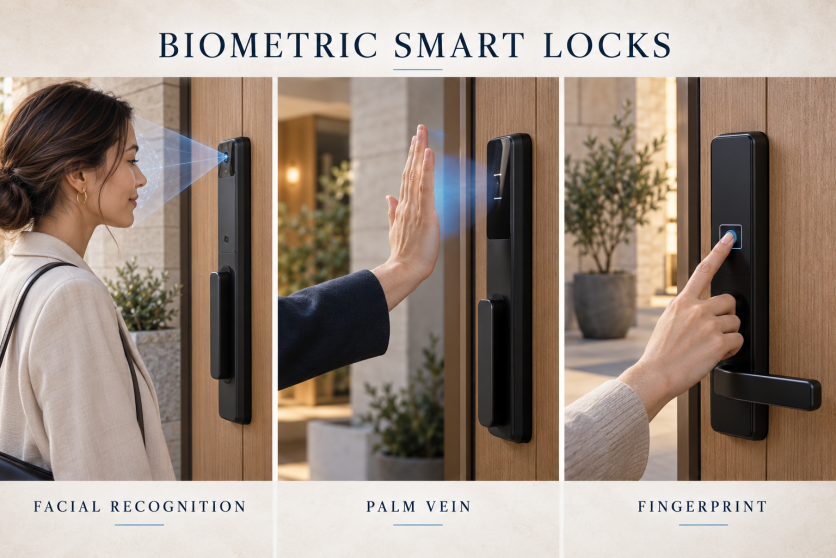
Concept illustration of facial, palm vein, and fingerprint unlocking; not a specific product model.
Summary
Choosing a biometric smart lock starts with understanding how you want to enter your home. Facial recognition smart locks offer hands-free authentication, palm vein smart locks provide contactless access using patterns beneath the skin, and fingerprint door locks offer familiar touch access. Each approach has advantages, but everyday reliability depends on the sensor, installation, environment, and people using the door. This guide compares the three technologies through practical questions: Can family members use them comfortably? What happens with wet fingers or poor lighting? How are biometric records protected? And which backup methods remain available when recognition fails or the battery runs low? Rather than ranking one technology as universally superior, it explains what buyers should verify before purchasing. Homeowners, apartment operators, and smart lock distributors can use these comparisons to match features with real needs, assess supplier claims, and choose a keyless entry solution that balances convenience, dependable access, privacy, and long-term ownership costs for their property and daily routines.
1. Facial Recognition Smart Locks: Hands-Free Entry for Everyday Convenience
A facial recognition smart lock checks an enrolled face before authorizing entry. Its main attraction is convenience: you can approach the door without finding a key or touching a reader. That can be useful when carrying shopping bags or returning home with children. Authentication may be hands-free, although you may still need to push the door or operate a handle.
The technology inside the lock matters. Buyers should distinguish basic image-based recognition from systems using depth information and infrared sensors. Lockly, for example, describes infrared sensing and operation in darkness for its Visage model. Those are model-specific capabilities, not features every facial recognition door lock automatically includes. [Source]
Before ordering, ask about the supported recognition distance, mounting height, lighting conditions, and any age restrictions. Test the lock with the people who will actually use it. Also check when automatic recognition activates and whether the settings suit a door beside a busy corridor. Facial authentication and a video doorbell are separate functions; one does not guarantee the other.
2. Palm Vein Smart Locks: Contactless Access Beyond Fingerprints
A palm vein smart lock uses near-infrared imaging to recognize vein patterns beneath the skin. The enrolled pattern is compared with a new scan when the user presents a palm. Fujitsu describes this underlying principle in its PalmSecure technology. It is different from identifying the visible lines on the surface of a hand. [Source]
For buyers who struggle with fingerprint readers, this is an option worth testing. Lockin advertises wet- and dry-hand recognition for its Veno products. Such claims should be checked on the exact lock being purchased, especially when environmental conditions differ from a demonstration. [Source]
Contactless does not mean completely hands-free. Users normally need to raise and position an uncovered palm within the sensor’s working range. Ask family members to try the gesture and check whether they can reach the reader comfortably. Compare the installed price, enrollment process, and backup access with other models. Do not assume palm vein recognition alone makes the entire lock more secure.
3. Fingerprint Door Locks: Familiar Touch Access with Practical Trade-Offs
A fingerprint door lock is a straightforward choice for people who prefer a deliberate touch to unlock. Readers may sit on a handle or on the front panel, so their placement can matter as much as the feature list. A comfortable reader should be easy to reach without awkward wrist movement.
Finger condition and enrollment quality can affect recognition. Ultraloq’s support guidance advises drying wet fingers and recording multiple angles on supported models. This is a useful reminder that reliable everyday access depends partly on correct setup. Follow the instructions for the specific sensor rather than assuming all fingerprint locks behave alike. [Source]
Where supported, enroll more than one finger and check access with each regular user. If someone repeatedly struggles to authenticate, choose a model with another convenient method rather than expecting them to keep retrying. For a shared household, a keypad or card option can be just as valuable as the fingerprint reader itself.
4. Biometric Smart Lock Security: What Buyers Should Verify
There is no universal security winner based only on whether a lock reads a face, palm, or finger. Compare the complete product: its mechanical construction, installation requirements, account controls, update support, and available evidence for biometric performance.
Ask suppliers how they test resistance to imitation attempts and what their published accuracy figures actually measure. A headline recognition percentage is not enough for a fair comparison when test conditions differ. For a purchasing decision, request documentation for the exact model and configuration.
Privacy deserves equally specific questions. Ask whether biometric templates are stored locally or sent to a server, how records are protected, who can manage them, and how to delete them when a resident moves out. A template is a processed biometric record; the term alone does not establish secure storage.
Finally, verify the fallback plan. Confirm which access methods work without an internet connection and what happens after battery depletion. Check the emergency power instructions: a USB port may provide temporary power rather than recharge the installed batteries. Practice the approved backup method before it is needed.
5. Choosing the Best Biometric Smart Lock for Your Property
Start with the people and the doorway. Facial recognition is worth considering when avoiding a touch is the priority. Palm vein recognition is worth testing when users want contactless access or find fingerprint authentication inconvenient. Fingerprint access suits people who prefer a familiar, intentional touch. The best choice is the one that works consistently for your users.
Next, confirm installation compatibility. Door thickness, lock body or deadbolt format, backset, handing, and available mounting space can determine whether a product is suitable. Verify these measurements before choosing a model based on its appearance.
For rental properties, compare guest access and permission management separately from biometrics. Requiring every short-stay guest to enroll a face or palm may be less convenient than issuing a time-limited code. For distributors and project buyers, request samples and evaluate enrollment, repeated entry, battery alerts, and backup access before placing a bulk order. Include gateways, installation, subscriptions, and after-sales support in the total cost.
Conclusion
Facial recognition, palm vein, and fingerprint smart locks offer different routes to convenient keyless entry. Face recognition can reduce interaction at the door, palm vein scanning offers a contactless gesture, and fingerprint readers provide familiar touch access. Choose by testing the actual product with its intended users, then checking installation fit, privacy controls, ongoing support, and emergency access. Share your door measurements and preferred unlocking methods with your supplier to narrow the options to a suitable configuration.
Website publishing fields
SEO title: Biometric Smart Locks: Face vs. Palm Vein vs. Fingerprint
Meta description: Compare facial recognition, palm vein and fingerprint smart locks. Explore everyday convenience, privacy and backup access to choose the right lock for your home.
URL slug: facial-recognition-vs-palm-vein-vs-fingerprint-smart-locks
Image alt text: Three scenes illustrating facial recognition, palm vein scanning, and fingerprint access on smart door locks.